SamiRise POS

Every sale. Every shift. One system.

Point-of-sale and business management software for shops, cafés and supermarkets. Checkout, stock, staff and the day’s numbers live in one place — on your counter, with or without an internet connection.

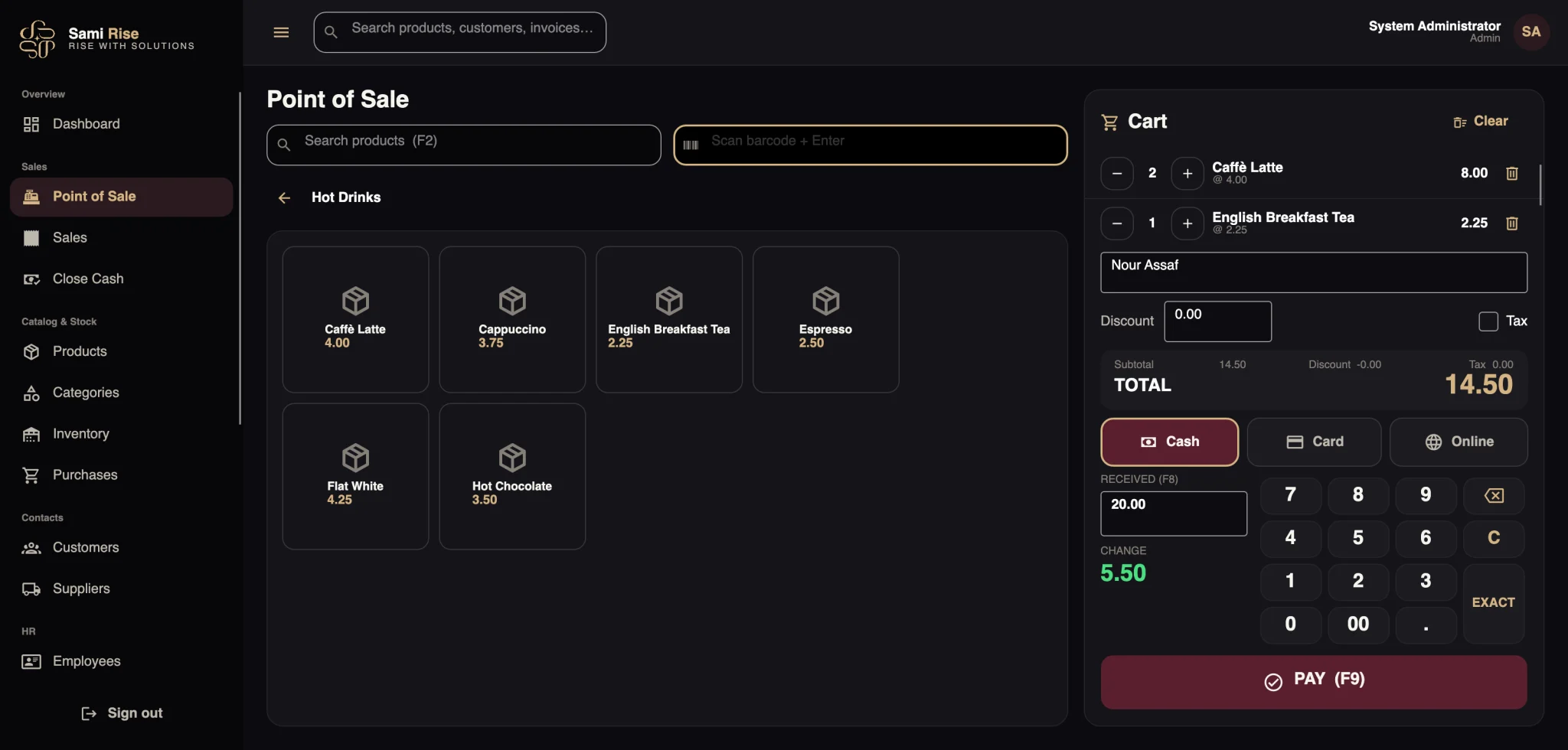
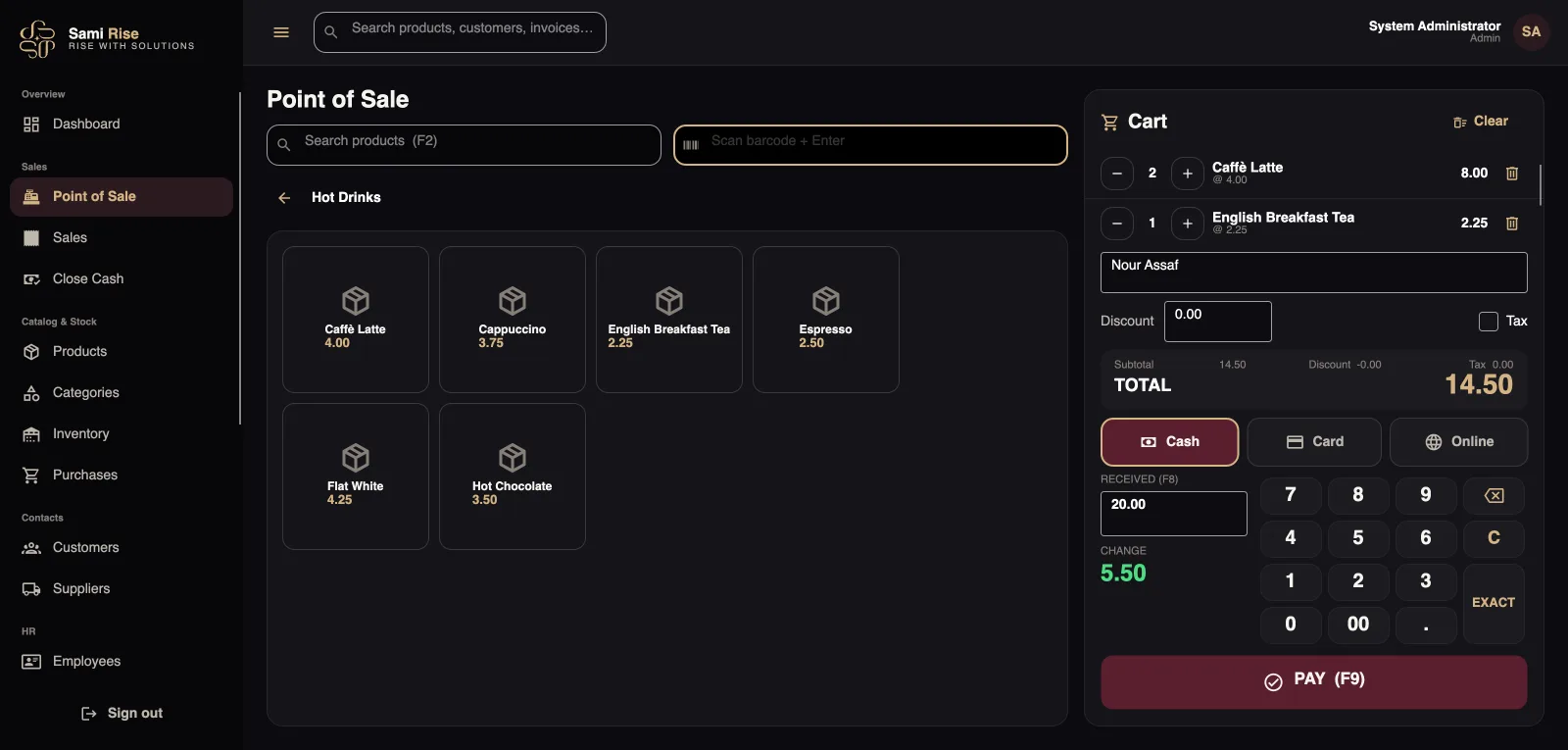
The SamiRise checkout screen: a Hot Drinks folder of products, a cart with three items totalling 14.50, cash selected, 20.00 received and 5.50 change.

On screen: the real SamiRise checkout, demo data

About SamiRise

Most counters run on three systems: a till, a notebook and somebody’s memory. SamiRise replaces all three with one, so the price on the shelf, the stock in the back and the cash in the drawer finally agree.

Made for independent businesses

The café on the corner, the family supermarket, the boutique with one till and bigger plans. SamiRise gives them the control that larger chains get from much larger systems.

Designed around the counter

Large touch targets, an on-screen keypad, keyboard shortcuts for regulars and a personal PIN instead of a password — because a queue doesn’t wait for a login screen.

Solutions

From the first sale of the day to the last count.

Seven parts of running a shop, handled by one system that shares the same products, the same stock and the same people.

01

Point of sale

A sale in a few taps.

Products are arranged in category folders, so the cashier finds them the way they’d find them on the shelf. Scan a barcode or search when that’s quicker. Take cash, card or online payment, enter what was handed over, and SamiRise works out the change.

  • Discounts on a line or on the whole sale; tax applied when you switch it on
  • Attach a customer to the sale by name or phone
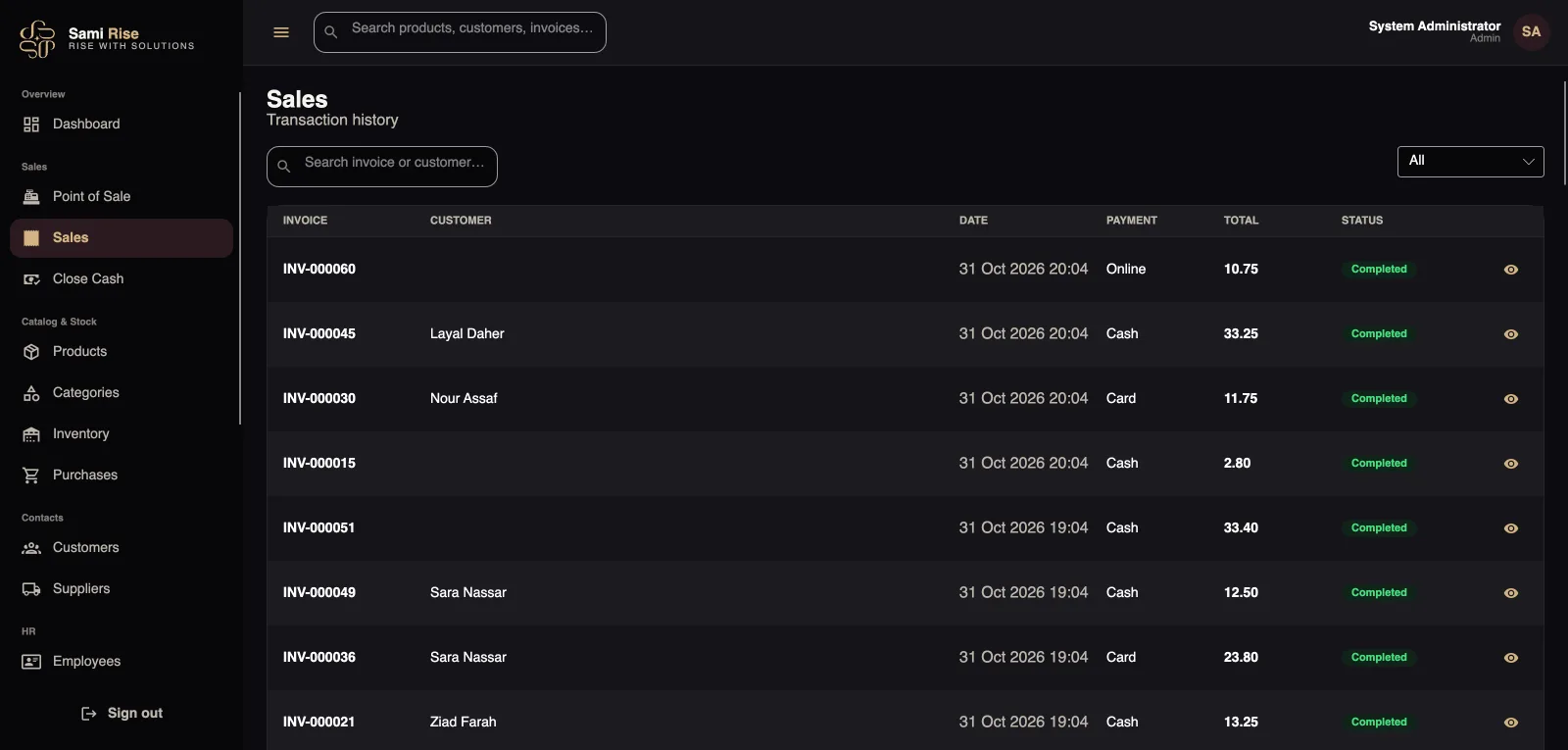
  • Numbered receipts, with reprint and void from the sales history
  • Keyboard shortcuts: F2 search, F4 customer, F8 amount, F9 pay
02

Inventory

Stock that explains itself.

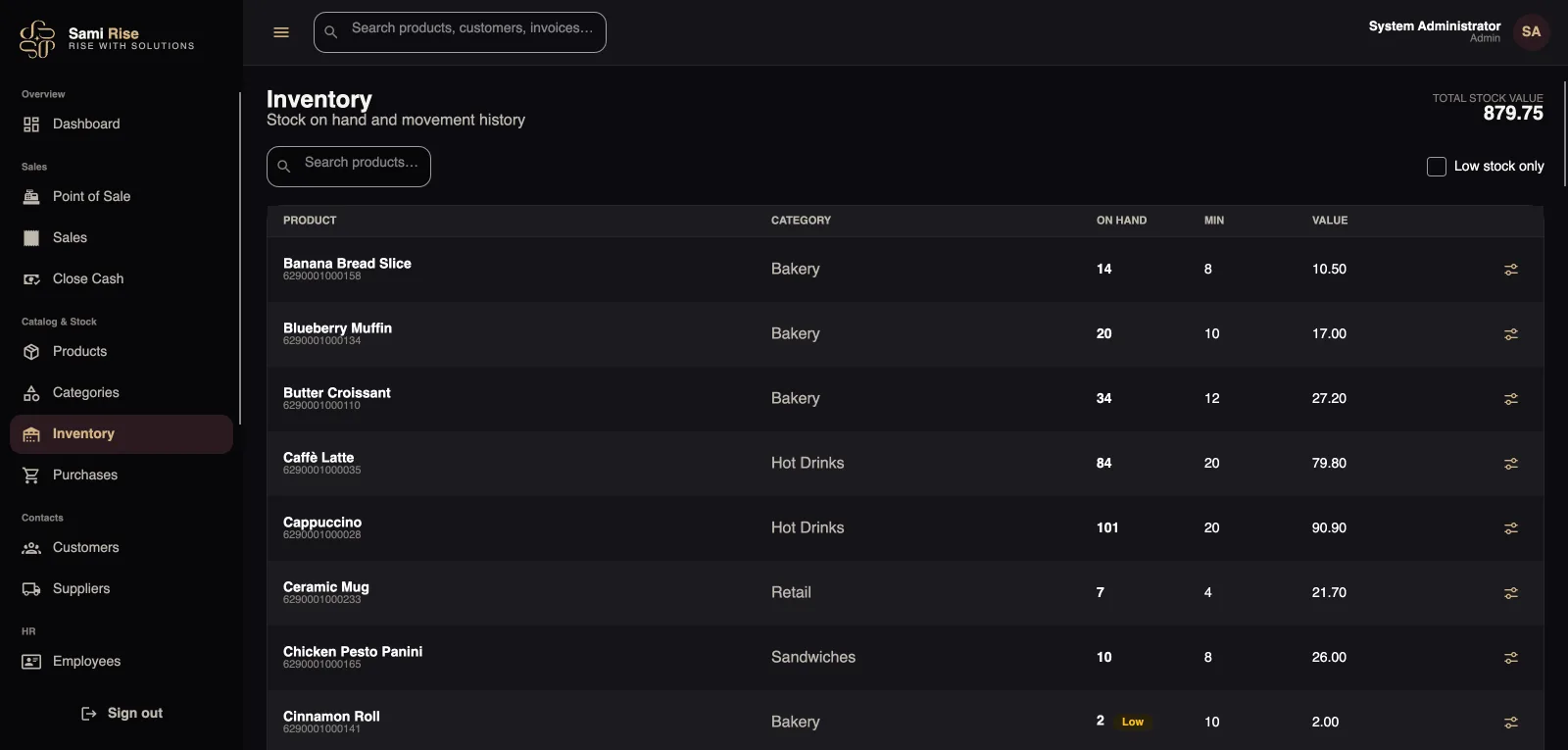
Every sale, delivery, adjustment and void is written to a movement history, so when a number changes you can see why — not just what it is now. Set a minimum for each product and the dashboard tells you what’s running low before the shelf is empty.

  • Stock on hand and stock value, updated with every sale
  • Adjustments require a reason and are logged
  • A sale can’t take stock below zero by mistake

Caffè Latte

6290001000035 · Hot Drinks
On hand105
TimeMovementChangeAfter
09:12Sale INV-000066−282
11:40Purchase PO-000014+24106
16:05Adjustment Reason: damaged−1105
03

Purchasing

Deliveries in. Costs up to date.

Record what arrived from which supplier and SamiRise raises the stock and updates each product’s cost price in the same step. Your profit figures then use what you actually paid, not what you paid last year.

  • Numbered purchase records with supplier, lines and total
  • Duplicate lines merged automatically
  • Purchase history kept on every supplier
PurchasePO-000014
Supplier
Hilltop Supplies
ProductQtyUnit costTotal
House Blend Beans 250g125.4064.80
Caffè Latte240.9522.80
Reusable Cup63.1018.60
Total106.20
RecordedStock raised · cost prices updated
04

Customers & suppliers

Know who you sell to — and buy from.

Add a customer to a sale and their history builds itself: how often they come in, what they’ve spent, which receipts are theirs. Suppliers keep their contact details and every purchase you’ve made from them.

  • Customer purchase count and total spent, always current
  • A customer purchases report for any date range
NA
Nour AssafCustomer since March
Purchases12
Total spent148.25
  • INV-000030Card11.75
  • INV-000024Cash9.50
  • INV-000011Online14.20
SupplierHilltop Supplies6 purchases · last on Tuesday
SupplierNorthside Bakery Co.11 purchases · last today
05

Close cash

End every shift with a count, not a guess.

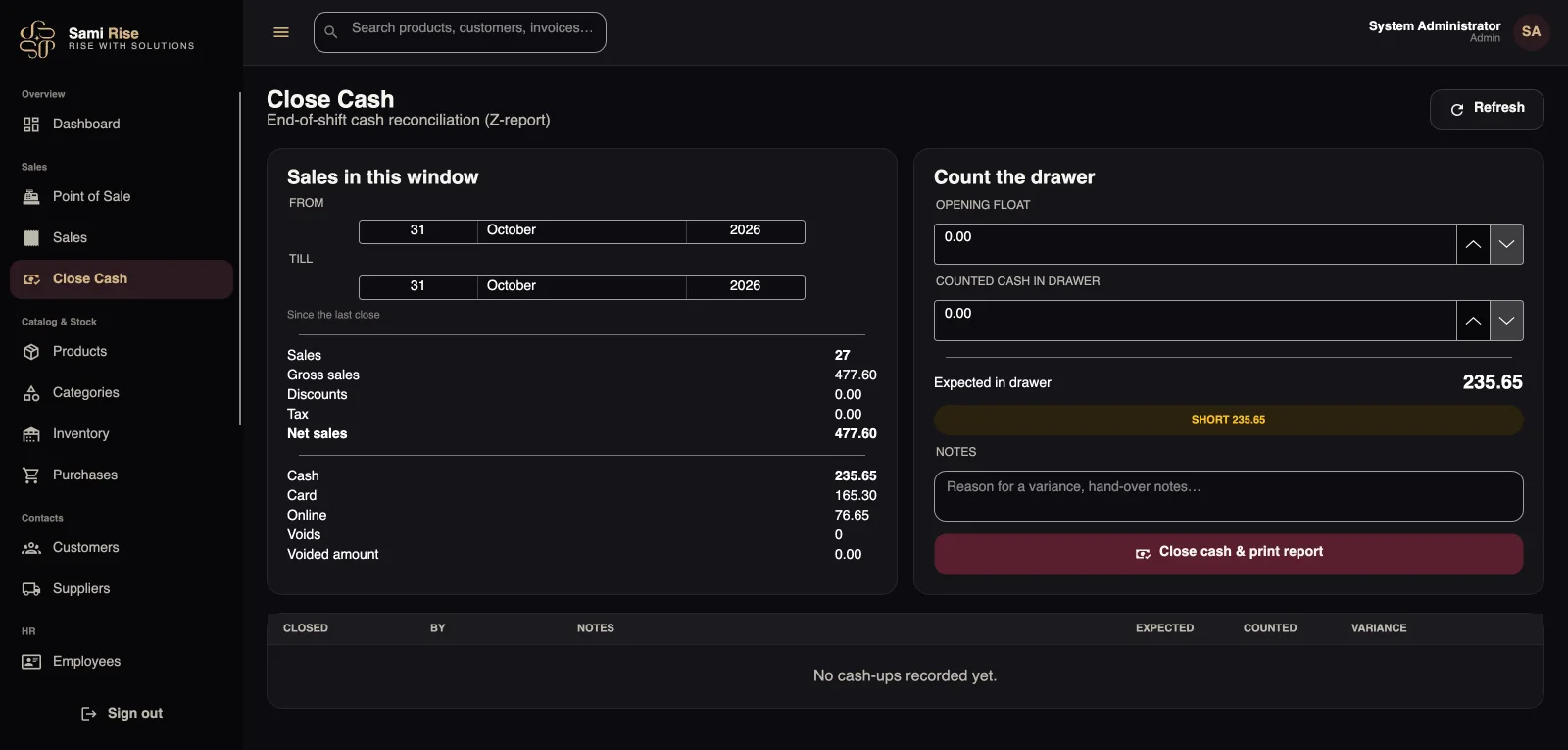
At closing, SamiRise totals the sales since the last close, splits them into cash, card and online, and tells you what the drawer should hold. Count it, enter the figure, and any difference is shown — and recorded — before you print the Z-report.

  • Opening float, gross and net sales, discounts, tax and voids
  • Over or short shown before the shift is closed
  • Every cash-up kept with who closed it and their notes
Expected in drawer235.65
Counted235.65

SHORT 235.65BALANCED · 0.00

Cash
235.65
Card
165.30
Online
76.65
06

Reports

Ten reports, ready when you are.

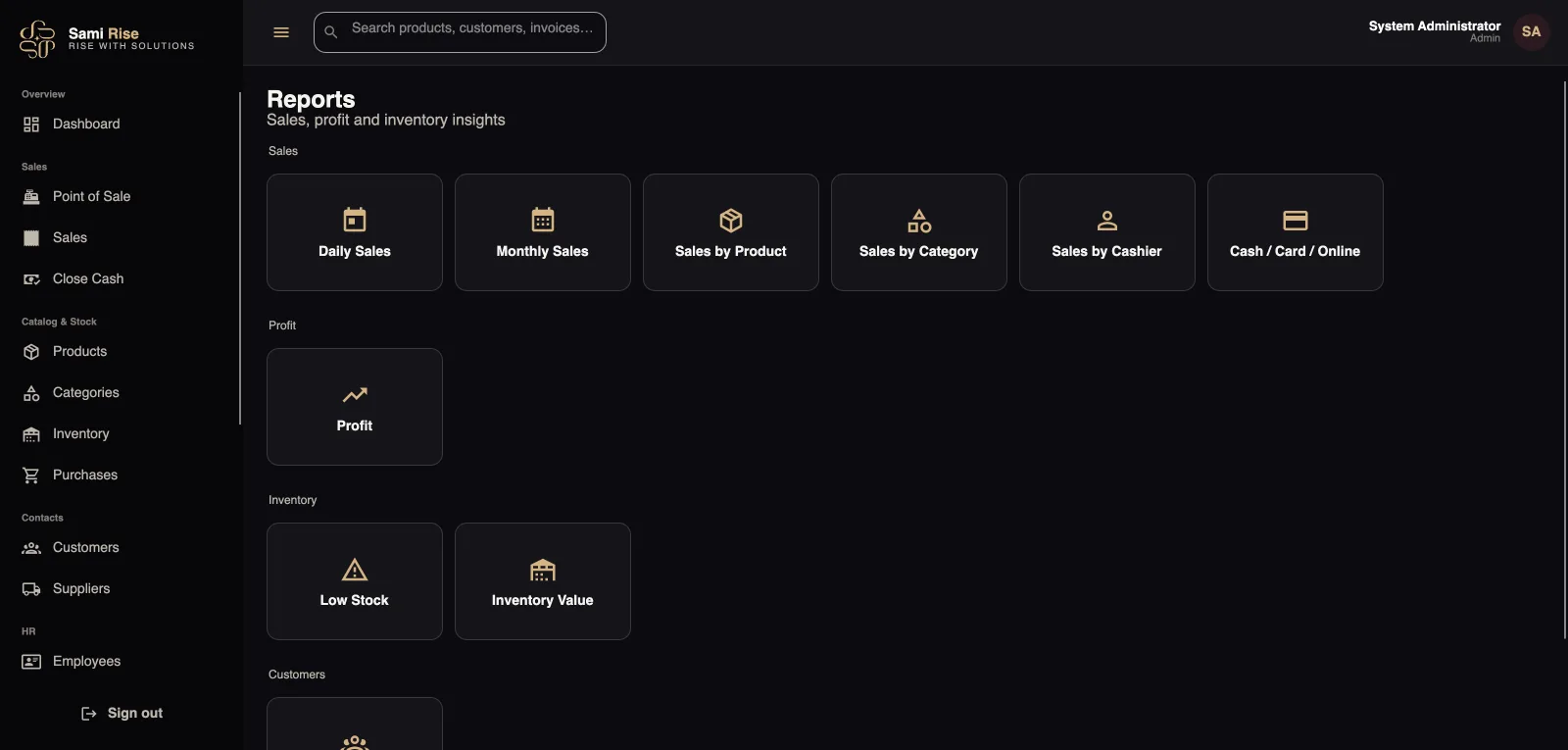
Daily and monthly sales; sales by product, category, cashier and payment method; profit; low stock; inventory value; customer purchases. Pick the dates, read it on screen, export it to CSV for your accountant.

  • Profit uses the cost recorded at the moment of each sale
  • Totals on every report where they make sense
Sales
  • Daily sales
  • Monthly sales
  • Sales by product
  • Sales by category
  • Sales by cashier
  • Cash / card / online
Profit
  • Profit
Inventory
  • Low stock
  • Inventory value
Customers
  • Customer purchases
Daily sales last 7 days
daily-sales.csvExport CSV
07

Team & access

The right access for every role.

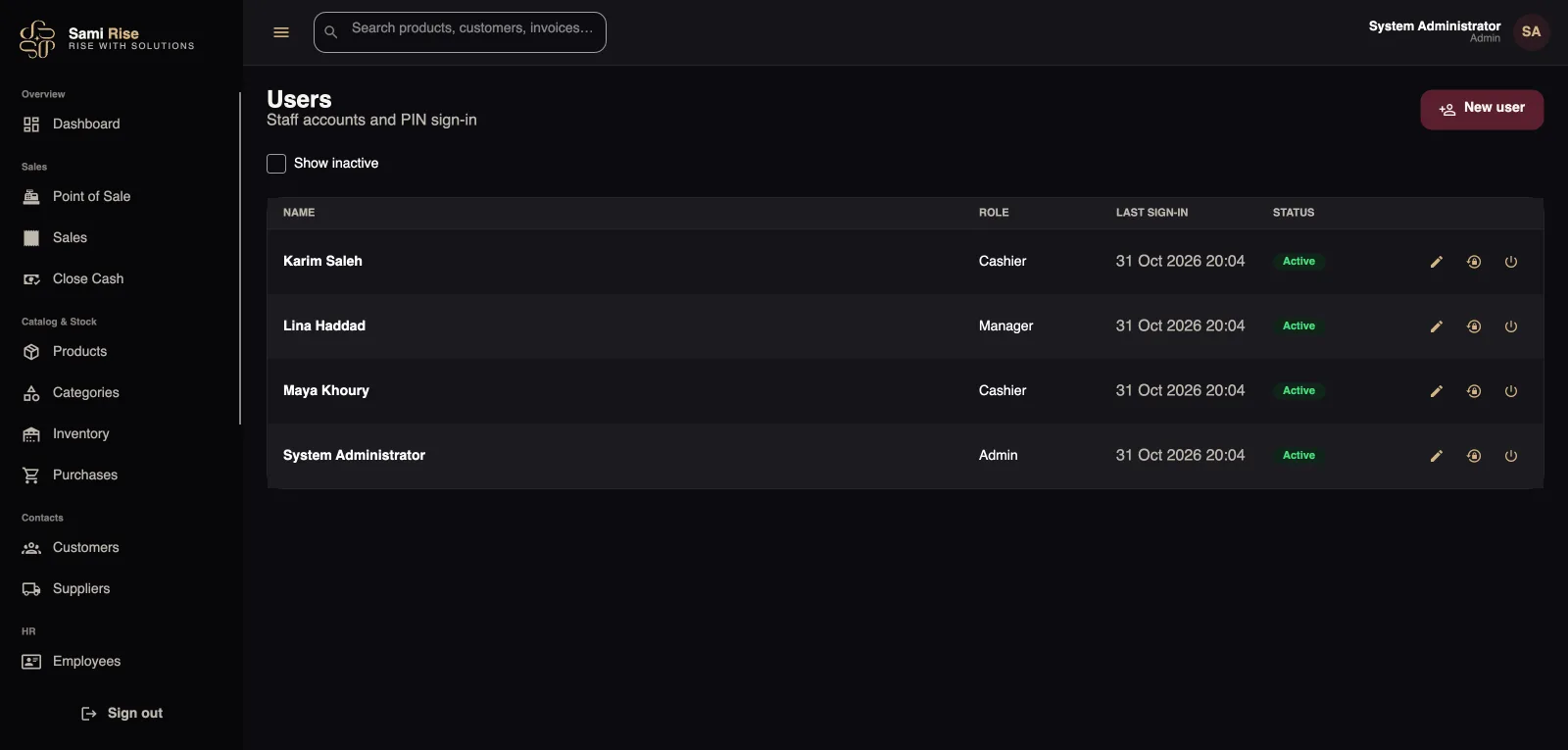
Everyone signs in with a personal PIN. Cashiers see the till; managers run stock, purchasing, reports and staff; admins see everything, including the audit log of who did what and when. Employee records, attendance, leave and monthly payroll sit in the same system.

  • Admin, Manager and Cashier roles
  • Clock in and out, leave requests and approvals
  • Payroll runs with payslips: draft, finalise, mark paid
Access by role, as set in SamiRise.
AreaCashierManagerAdmin
Checkout & sales
Close cash
Customers
Products & stock
Purchases & suppliers
Reports & dashboard
Staff, attendance, payroll
Users, settings, audit log

Product tour

The screens your team will actually use.

Pick a screen. The numbered markers explain what each part does — hover them, or read the notes underneath.

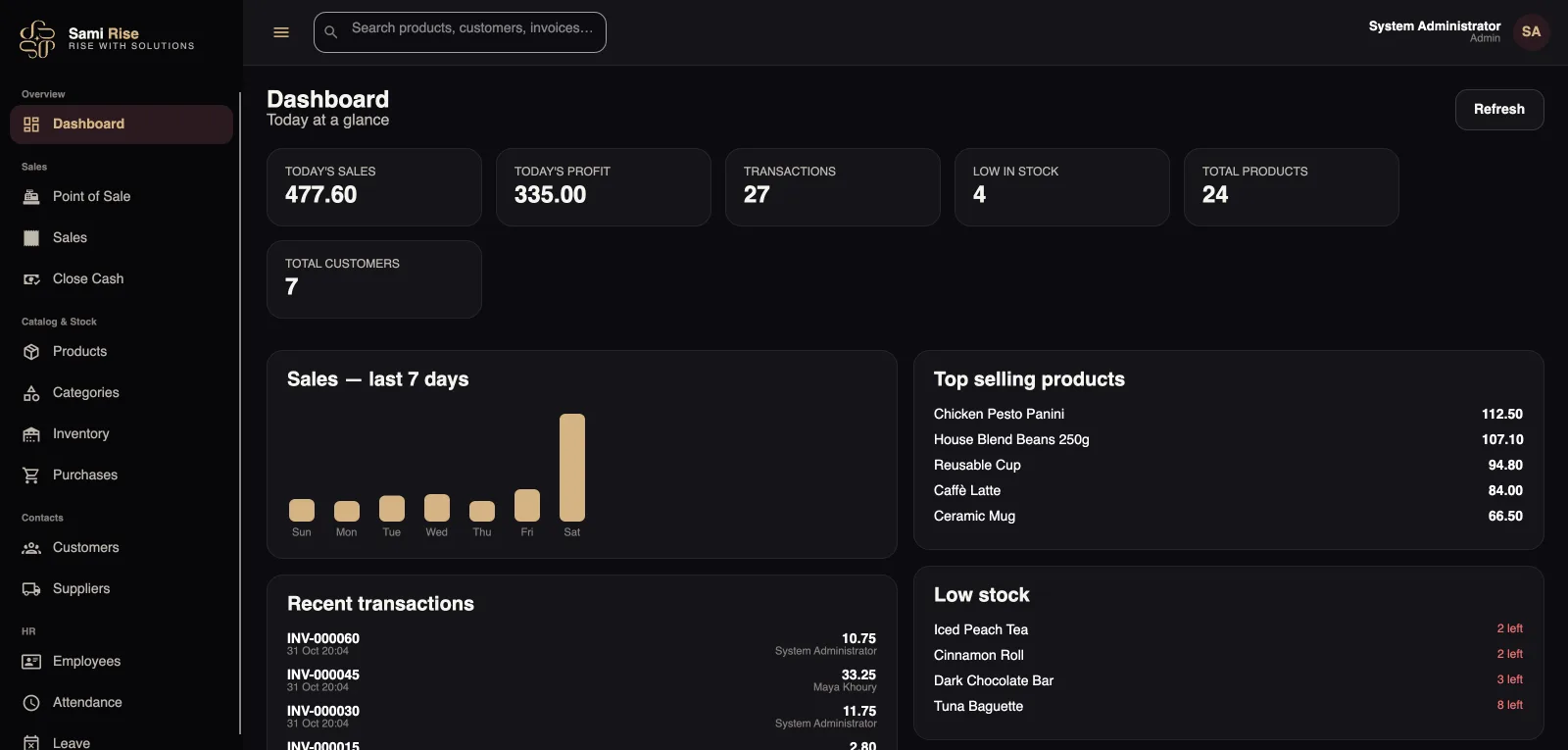
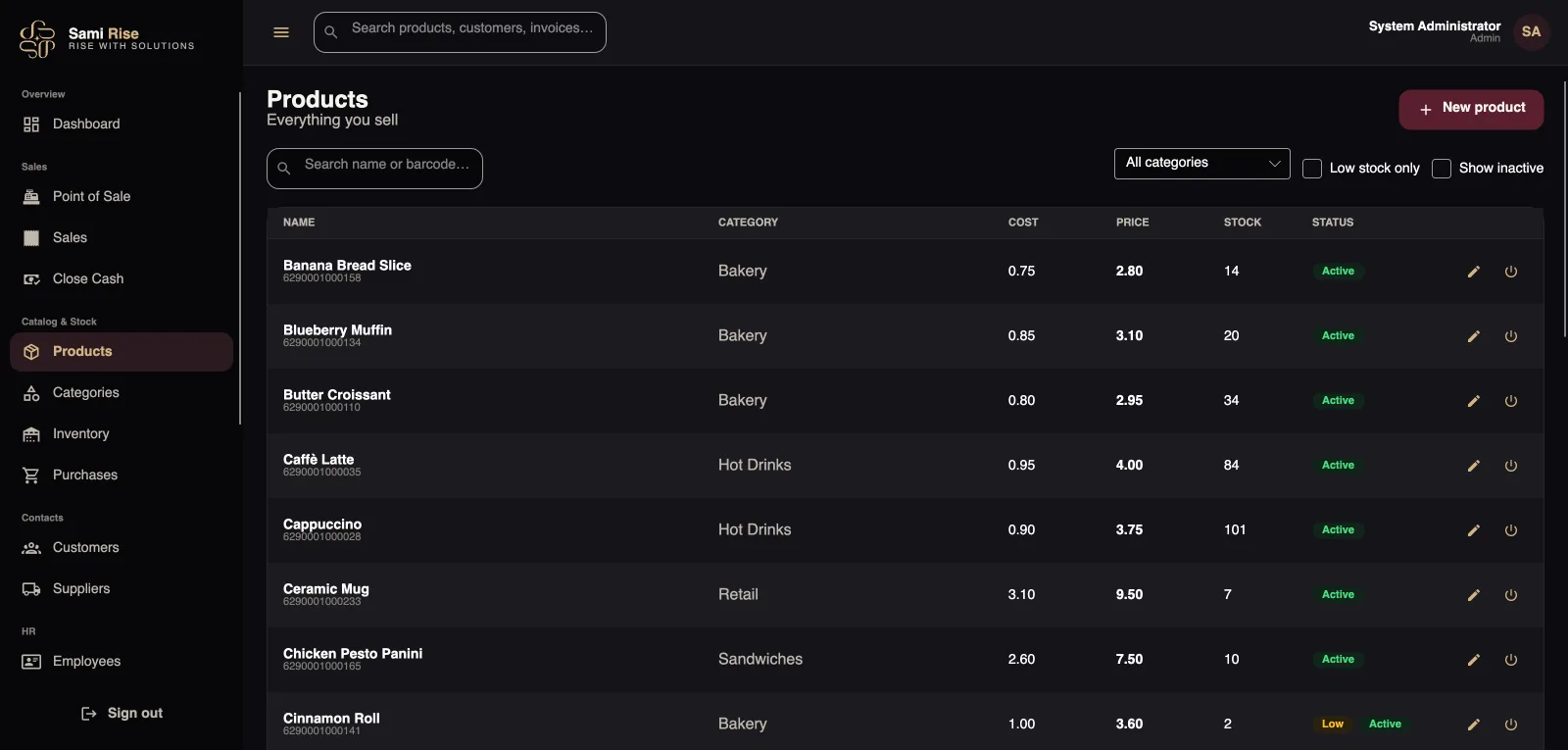
These are real screens from SamiRise POS, captured from the running app with demo café data.

SamiRise checkout screen with the Hot Drinks folder open and a three-item cart paid in cash.

Checkout

Category folders, barcode scanning and search on the left; cart, payment and change on the right. The cashier never leaves the screen.

  1. Scan a barcode and press Enter — the product goes straight into the cart.
  2. Change a quantity or remove a line with one tap.
  3. Cash, card or online, stored on the sale and in the cash-up.
  4. On-screen keypad for the amount received.
  5. Change calculated as you type.
  6. Pay completes the sale, updates stock and issues the receipt.

Real screens from SamiRise POS, captured from the running app with demo café data.

Industries

Built for the counter. Whatever’s on it.

The same system, set up around what you sell. Choose a business to see how it fits.

Selling over a counter and keeping stock? Tell us about your business.

Cafés & coffee shops

Morning queues move on taps, not typing. Drinks, pastries and retail beans sit in folders the team knows by heart, and by mid-afternoon the dashboard tells you whether the croissants will last.

  • Folder checkout — the whole menu within two taps, with photos if you add them.
  • Low-stock alerts for the items that sell out first.
  • Sales by product to see what earns its place on the menu.

Folders above use the same demo café as the product tour.

Why SamiRise

A working day, accounted for.

The value of a POS system isn’t a feature list. It’s what happens to an ordinary day when every part of it is recorded in the same place.

  1. Open

    Staff sign in with their PIN and clock in. The overnight backup has already been taken when the app started.

    Simpler daily operations
  2. The rush

    Folders, scanning and an on-screen keypad keep the queue moving. Change is calculated; nothing is written down.

    Faster checkout
  3. Delivery

    The supplier’s delivery is recorded once. Stock rises, cost prices update, and the movement history shows where it came from.

    Inventory visibility
  4. Check-in

    The dashboard shows today’s sales and profit, the best sellers and what’s running low — in time to do something about it.

    Better decisions
  5. Close

    Count the drawer. SamiRise shows what it should hold, records the difference and prints the Z-report.

    Accurate reporting

And when you’re not there, the numbers still are.

With SamiRise Cloud, a till that has synced shows its sales, cash-ups, stock and catalog in a web dashboard — so you can check the day from home, or look across several tills at once. Selling never depends on it.

Technology

Built to keep selling when the internet doesn’t.

SamiRise runs on the till itself. Your data lives on your machine, is backed up automatically, and only goes online when you decide to sync.

ON THE COUNTER — OFFLINE ONLINE — OPTIONAL SYNC WHEN YOU PRESS IT Till 1 · Front counter Sales, receipts, cash-ups Local database Automatic backups Till 2 · Second counter Sells on its own Own database & backups Linked with a one-time code SamiRise Cloud WEB DASHBOARD Reports across tills Sales & cash-up history Products, prices, stock Till management

Offline first. Cloud when you want it.

Select a part of the diagram to see what it does, or run a sync.

The till

Everything a shop needs to trade runs on the till: selling, stock, purchasing, staff and reports. It doesn’t need a connection to work — a dropped line never stops a sale.

Idle · last sync when you choose

Specifications

SamiRise POS · current release
Runs on
Windows desktop, installed with a standard setup program. Touch screen, mouse and keyboard.
Internet
Not needed to sell. Used only when you press Sync.
Your data
Kept in a local database on the till, including product photos.
Backups
Automatic when the app starts, with older copies rotated out. Manual backup and restore from the Backup screen.
Sign-in
A personal PIN per person, stored only as a secure hash.
Roles
Admin, Manager, Cashier — each limited to its own screens.
Audit log
Sign-ins, sales, voids, product, stock, user and settings changes, with who and when.
Stock integrity
Each sale updates stock and its history together, or not at all. Overselling is blocked.
Payments
Cash, card and online recorded per sale, with change calculated for cash.
Exports
Every report exports to CSV. Receipts and payslips are saved as text.
Several tills
Link tills to one SamiRise Cloud account; stock is combined from every till’s movements.
Cloud
Each business is kept separate. Catalog edits sync both ways; the newest change wins.

Contact

Let’s set up your counter.

Tell us what you sell and how many tills you run. We’ll walk you through SamiRise on a setup that looks like your business, and answer the questions a brochure can’t.

  1. 01
    Tell us about your businessWhat you sell, how many counters, how you work today.
  2. 02
    See it workingA walkthrough of the screens your team would use.
  3. 03
    Get startedInstall on your till, add your products and open for business.

Request a demo

Takes a minute. We’ll reply to arrange a time.

Opens your email app with the details filled in.